How to Use Anki: A Beginner’s Guide Without the Rabbit Holes
· 8 min read
To use Anki, install the free desktop app, make a deck, add cards with a question on the front and an answer on the back, and review whatever it shows you each day, pressing the button that matches how well you remembered. That’s the whole method. It looks complicated because it has hundreds of settings and add-ons, and nearly all of them can wait. This guide takes you from nothing to a working daily habit, using Anki’s own manual wherever the details matter.
What the words mean
Anki’s vocabulary trips up a lot of beginners, but you only need 4 terms for now.
| Term | What it means |
|---|---|
| Card | A question and answer pair. It’s the thing you review. |
| Deck | A group of cards, usually one per subject. Decks can nest, like Biology::Cells. |
| Note | The information you type in. One note can create more than one card. |
| Note type | The template for a note. Basic is front and back, and Cloze hides words in a sentence. |
Install it, and know which version costs money
Anki is free almost everywhere. Start on a computer, because adding cards is far quicker with a keyboard.
- Windows, Mac or Linux: free from apps.ankiweb.net. Anything else claiming to be the desktop app probably isn’t.
- AnkiWeb: a free account that syncs your cards between devices. Press Sync at the top of the main screen, and choose Upload on your first sync if your computer has the cards.
- Android: AnkiDroid is free and made by volunteers.
- iPhone and iPad: AnkiMobile is a one-off $24.99 in the US, and its sales fund Anki’s development. If you don’t want to pay, you can review in your phone’s browser on AnkiWeb.
Try this: Check the developer before you pay for anything with “Anki” in the name. AnkiApp and Anki Pro are separate products from other companies.
Make your first deck in ten minutes
Don’t plan a system yet. Make a small deck for one topic you’re studying this week, and see how it feels.
- On the main screen, click Create Deck at the bottom and name it after the topic.
- Click Add at the top. Check the Type says Basic, and the Deck is the one you just made.
- Type a question in Front and the answer in Back, then click Add. The window stays open for the next card.
- Add about 10 cards, then close the window.
- Click your deck, then Study Now.
- Try to answer before you show the answer. Then press the button that matches how it went.
Write cards that work
Most of what goes wrong with Anki goes wrong here. A long card is hard to grade honestly, because you’ll remember half of it and never be sure whether that counts. Keep each card to one idea, ask a real question, and use your own words.
| Front | Back | |
|---|---|---|
| Too big | Mitochondria | A paragraph on structure, function and the Krebs cycle |
| Better | Where in the mitochondrion does the Krebs cycle happen? | The matrix |
| Better | What does the electron transport chain need at the very end? | Oxygen, to accept the electrons |
3 card types worth knowing
Basic will do for most things. These three cover the rest.
- Basic (and reversed card): one note makes two cards, front to back and back to front. Good for vocabulary, where you need to go both ways.
- Cloze: hides part of a sentence. Select the words and click the [...] button in the editor, and you’ll see something like “Canberra was founded in {{c1::1913}}”. Good for facts that make more sense in a sentence.
- Image Occlusion: hides labels on a picture. Click Add, set the Type to Image Occlusion, choose your image and draw boxes over the labels. Good for anatomy and diagrams. It’s been built in since version 23.10.
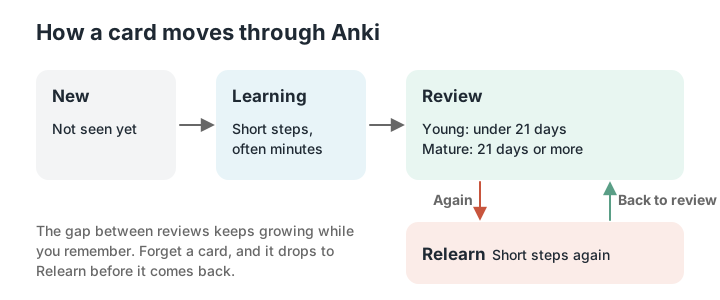
How a card moves through Anki
A new card goes through short learning steps, often minutes apart, until you’ve seen it a few times. Then it becomes a review card, with gaps that keep growing: days, then weeks, then months. Forget it during a review and it drops into relearning for a while before coming back. That growing gap is what makes it efficient. In a 2009 study of students using flashcards, Nate Kornell found spacing beat cramming for 90% of participants, even though 72% believed cramming had worked better.
A daily routine that lasts
Open Anki once a day, ideally at the same time, and clear what’s due. Most people find 15 or 20 minutes is enough at first. You can do it on the bus once it’s synced to your phone.
Go easy on new cards. Every card you add today brings reviews with it for weeks, so 30 new cards a day feels fine for a fortnight and then buries you. Start with about 10, watch your daily reviews for a couple of weeks, and only then decide whether to add more.
Fall behind and you’ll be tempted to quit. Stop adding new cards instead, and work through the backlog a bit at a time until it’s manageable again.
The settings worth changing
Click the gear next to a deck and choose Options. Change these two things and leave the rest alone for your first month.
- New cards/day: how many new cards you’ll see each day. Set it to whatever you can keep up with.
- FSRS: the scheduling system, in its own section at the bottom. Turn it on, and leave desired retention at the default of 90%. The manual warns that workload climbs quickly above 90%, and can get overwhelming above 97%.
Common beginner mistakes
Nearly everyone who gives up on Anki does so for one of these reasons.
- Adding too many new cards in the first week
- Writing long cards with several facts on them
- Pressing Good on answers you didn’t really know
- Skipping a few days, then being scared of the number
- Spending an evening on add-ons and themes before reviewing anything
- Making cards for things you don’t understand yet
When Anki isn’t the right tool
Anki’s at its best for things you want to remember for months or years. A 2015 study by Felix Deng and colleagues linked more flashcard review with higher scores on a medical licensing exam, although it couldn’t prove the cards were the cause.
It’s a harder sell for a module exam three weeks away with 200 slides to get through, because you can spend most of your time typing cards. And flashcards alone won’t show you how you’d do on a real paper, so add practice questions whichever tool you use.
Keep going
Common questions
Is Anki free?
Yes on desktop, on the web through AnkiWeb, and on Android through AnkiDroid. The official iPhone and iPad app, AnkiMobile, is a one-off purchase of $24.99 in the US.
How many new Anki cards should I do a day?
Start with about 10. Each new card adds reviews for weeks to come, so see what your daily review load looks like after a couple of weeks before adding more.
Should I make my own cards or download a deck?
Make your own for a specific course, because writing them helps and they’ll match your exam. Shared decks are useful for large standard topics, as long as you’ve already learned the ideas behind the cards.
What’s the difference between Hard and Again?
Again means you got it wrong or couldn’t recall it. Hard means you got it right, but with doubts or only after a long pause. If you were wrong, always press Again.
What is FSRS in Anki?
A scheduling system that predicts when you’re likely to forget each card and sets the next review to match. You turn it on at the bottom of the deck options. Anki 23.10 and later support it, and AnkiDroid does from version 2.17.
Can I use Anki on an iPhone for free?
Yes, through AnkiWeb in your phone’s browser, with fewer features and only when you’re online. The official app, AnkiMobile, costs $24.99 once in the US.
Calm Study
If you like Anki’s scheduling and don’t have time to write the deck, Calm Study writes flashcards from your own notes and slides and brings back the ones that are due. You grade them Again, Hard or Good, and the same notes can become a quiz or a mock. If you’re learning something for years, Anki may still be the better fit.
References
- Anki Manual. Getting started. https://docs.ankiweb.net/manual/getting-started
- Anki Manual. Studying. https://docs.ankiweb.net/manual/studying
- Anki Manual. Deck options. https://docs.ankiweb.net/manual/deck-options
- Anki Manual. Editing and adding cards. https://docs.ankiweb.net/manual/editing
- Anki Manual. Syncing with AnkiWeb. https://docs.ankiweb.net/manual/syncing
- Anki. Official downloads and pricing. https://apps.ankiweb.net/
- AnkiMobile Flashcards. App Store listing (US). https://apps.apple.com/us/app/ankimobile-flashcards/id373493387
- Kornell, N. (2009). Optimising learning using flashcards: Spacing is more effective than cramming. Applied Cognitive Psychology, 23(9), 1297–1317. https://doi.org/10.1002/acp.1537
- Deng, F., Gluckstein, J. A., & Larsen, D. P. (2015). Student-directed retrieval practice is a predictor of medical licensing examination performance. Perspectives on Medical Education, 4(6), 308–313. https://doi.org/10.1007/s40037-015-0220-x