AI Study Tools: What Actually Helps You Learn
· 6 min read
AI study tools can make studying faster and more effective, or they can quietly replace the thinking that learning depends on. The difference is not which brand you use. It is whether the tool makes you retrieve and explain answers, or hands them to you. This guide covers what the research says, the main types of AI tools for students, and how to choose and use one well.
The problem with most AI study help
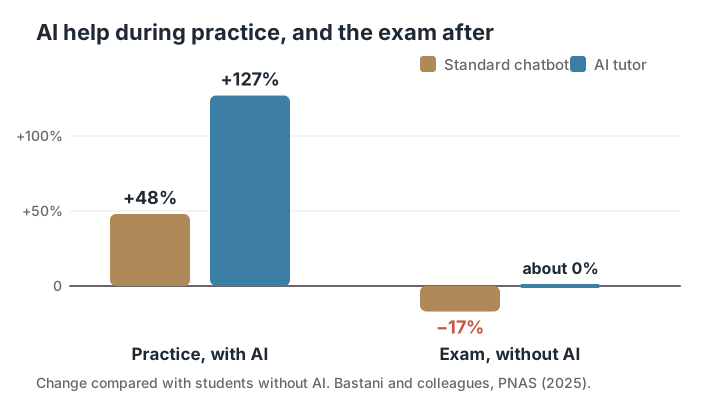
In a field experiment with nearly a thousand high school maths students, published in PNAS in 2025, researchers led by Hamsa Bastani gave some students access to a standard AI chatbot during practice and others to a version designed as a tutor, which gave hints instead of answers. A control group had no AI at all.
During practice, students with the standard chatbot scored 48% higher than the control group, and students with the tutor version scored 127% higher. But in a later exam without AI, the standard chatbot group scored 17% lower than the control group. Chat logs showed many of them had simply asked for answers. The tutor group, whose AI made them do the work, performed about the same as the control group on the exam.
What makes an AI study tool actually help
The research on learning is clear about what builds memory and understanding: retrieving answers from memory, spacing that practice over time, and explaining ideas in your own words. A good AI study tool uses AI to make those things easier, not to skip them.
- It asks you questions before showing answers.
- It works from your course materials, not just general knowledge.
- It shows where each answer came from, so you can check it.
- It brings back what you got wrong on later days.
- When you ask for help, it explains or gives a hint rather than doing the whole task.
Types of AI tools for students
Most AI study tools fall into a few groups. Each can help or hurt depending on how you use it.
| Type | What it does | Helps when | Risk |
|---|---|---|---|
| General chatbots | Answers questions on anything | You ask it to quiz you or explain a step | Doing the work for you; errors |
| Flashcard and quiz makers | Turns notes into questions | You answer before you look | Cards with mistakes go unchecked |
| Lecture transcription | Records and transcribes classes | You listen in class and review after | Never reviewing the transcript |
| AI tutors | Explains topics and steps | It gives hints and checks your reasoning | Asking for answers, not help |
| Study planners | Schedules what to study when | You follow the plan | Planning instead of studying |
| Writing assistants | Helps draft and edit text | Feedback on your own drafts | Academic misconduct |
Accuracy: why grounding matters
AI models can produce confident, fluent answers that are wrong. In a study tool, that is a real problem: a wrong flashcard drilled twenty times becomes a wrong memory. Tools that generate content only from the materials you upload, and show which page each answer came from, reduce this risk. They do not remove it.
Grounding also matters for relevance. Your course has its own terminology, emphasis, and examples, and your exam is written by someone who taught from your materials. A tool working from general knowledge may teach you correct facts that are not what your exam asks for.
Be especially careful with numbers, dates, names, formulas, and quotations. These are the details AI is most likely to get subtly wrong, and the ones exams most often test. If a tool cannot show you where a figure came from, treat it as unverified until you have checked it.
Try this: For any AI-made card or answer that surprises you, check the source page before you study it. It takes seconds and prevents learning mistakes.
How to use AI for studying without outsourcing the thinking
A few simple rules keep AI on the right side of learning.
- Try first. Attempt the question or problem before asking AI anything.
- Ask for questions, not answers: “quiz me on chapter 3” rather than “summarise chapter 3”.
- Ask for hints: “what is the next step?” rather than “solve this”.
- Explain back: after an AI explanation, close it and explain the idea in your own words.
- Keep your notes as the source of truth, and check AI output against them.
A good AI study session, step by step
Here is what a 40-minute session might look like when AI is used well. Start with ten minutes of quiz questions generated from the lecture you are revising, answered before you see any options or answers. Note every miss.
For each miss, spend a few minutes on the source page in your notes. If it still does not make sense, ask an AI tutor to explain that one point, then close the explanation and write it in your own words. Then go back and answer the missed questions again.
Finish with five minutes of flashcards on older topics that are due for review. The AI wrote the questions, scheduled the review, and explained the hard point. You did every bit of the remembering.
Academic integrity
Using AI to study, by quizzing yourself, getting explanations, or planning revision, is generally different from using it to produce work you submit. But rules vary widely between institutions, courses, and even assignments. Check your course’s policy before using AI for anything you will hand in, and when in doubt, ask.
Exams are the clearest case: you will not have AI in the exam room. That is the strongest argument for using AI tools that build what you can do on your own.
How to choose the best AI study tools for you
The best AI for studying is the one that fits how learning works and how your course is taught. Ask these questions before committing to a tool.
- Does it work from my own notes, slides, and recordings?
- Does it make me answer before showing me the answer?
- Can I see the source of each answer?
- Does it space reviews and bring back my mistakes?
- Does it match my exam format, such as multiple choice, short answer, or essays?
- Does it save me time on setup, so more of my time goes on studying?
Common questions
What is the best AI for studying?
The best AI for studying is one that quizzes you from your own course materials, shows where answers came from, and spaces your reviews. General chatbots can work if you ask them to quiz you and give hints rather than answers.
Can AI make flashcards from my notes?
Yes. Many AI study tools turn notes, slides, and PDFs into flashcards. Check a sample against your notes, especially numbers and definitions, and edit any card that is unclear or wrong.
Is using AI to study cheating?
Using AI to quiz yourself, get explanations, or plan revision is usually fine. Submitting AI-written work as your own often is not. Rules vary, so check your institution’s and course’s policy.
Are AI study tools accurate?
Not always. AI can make confident mistakes. Tools that work only from your materials and cite their sources are more reliable, but you should still spot-check anything important.
Can an AI tutor replace a human tutor?
For explanations, practice questions, and instant feedback, an AI tutor can cover a lot of ground at any hour. A human tutor is still better at noticing why you are stuck, motivating you, and adapting to how you think. Many students get the most from using both.
Can AI study tools make you worse at exams?
They can, if they do the thinking for you. Research has found students who used AI for answers during practice did worse on exams without it. Tools that make you work out the answer avoid this.
Calm Study
Calm Study is built around the parts of AI that help you learn. It works from the notes, slides, and lectures you add, asks before it tells, names the page for every quiz miss, spaces your reviews, and has a tutor that explains in the words of your own materials.